
For an FH6 Daily Challenge, check that the individual card is available, read its exact action and finish it before its own timer expires. The daily release schedule, a card's completion window and the weekly season transition are different checks. This guide, reviewed on November 17, 2026, explains the distinctions and uses dated City Life examples to show how to verify skills, races, distance tasks and rewards.
Find the Daily Challenge card for the right week
Open the current Festival Playlist and identify the card explicitly labelled Daily Challenge. Read its name, instruction and timer before driving. A search result can show a genuine FH6 task from another Series, while an older Forza discussion can describe a different game's schedule. Matching the category and date prevents a useful-looking guide from sending you toward the wrong objective.
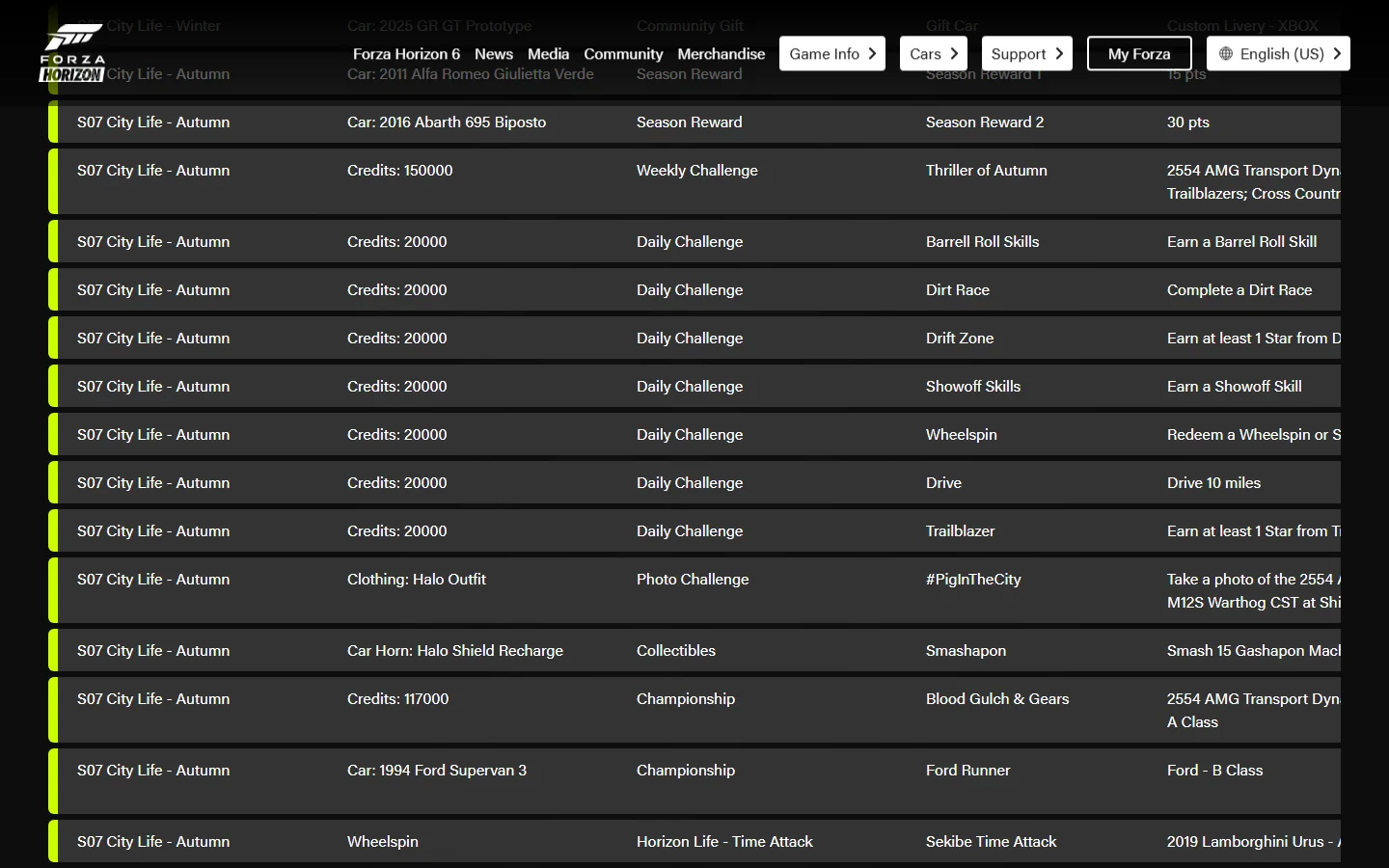
As of November 17, 2026, the official Forza event hub identifies City Life Autumn as November 12-19. Its Daily entries include a Barrel Roll Skill task, a Dirt Race, a Wheelspin redemption and a ten-mile drive. These are dated examples of different instruction types. The table is useful for planning, but the active in-game card shows whether a particular Daily is available to you now.
Keep the exact instruction when making a plan. A task asking for one named Skill differs from a general score target. A requirement to redeem a Wheelspin differs from earning one, and driving a distance differs from winning a race. Small differences in the verb often explain why an apparently related action did not change the check.
A Daily task is not a chapter in the Weekly Challenge
The Weekly Challenge is a separate multi-chapter chain involving its own required vehicle and sequence. A Daily task can involve a similar action without inheriting that chain's car requirement. Conversely, finishing a Daily does not establish that a Weekly chapter is complete. Inspect both cards when you are trying to combine activities.
The Weekly Challenge guide explains that chapter process. For Dailies, the useful starting questions are whether this individual card is unlocked, what action it requires and how long it remains available. Treat it as its own small objective rather than an extra step automatically attached to the week's featured car.
If several tasks look similar, make one short line for each: category, name, action and remaining time. That helps when an activity satisfies one condition but not another. You can combine compatible tasks efficiently, but check the results separately. A shared drive is a convenience; it is not evidence that every related card must have credited the same event.
Read unlock and expiry timers separately
There are two questions to answer on a Daily card: when it becomes available and when its own completion window ends. The weekly season transition is another event. Treating all three as one deadline can make you attempt a locked task too early or abandon an available one because the surrounding season has changed.
Use the daily card's remaining time
The FH6-specific Festival Playlist community reference and dated Lights to Flag Series 6 reporting describe a daily release schedule at 14:30 UTC, with seven days to finish each Daily after it opens, including a window that can extend beyond a season. That is useful background for understanding overlapping cards. It should not replace the availability and remaining-time display on your current version of the game.
Check the individual card before relying on an older schedule. Record both its state and the remaining time if you intend to return later. A preview of a future objective does not establish that attempts already count, and a historical guide does not establish that an expired task can be reopened. If the card is locked, plan the action for when it opens rather than repeatedly testing it now.
Also separate completing a Daily from claiming a different season's rewards. A remaining Daily window does not, by itself, prove that every other expired activity or reward remains available. Inspect the relevant card or ladder for the result you want. That distinction matters when a late Daily is your final planned source of progress.
Convert UTC carefully when checking a rollover
Forza's City Life announcement scheduled the Series start for November 5 at 14:30 UTC. In November's standard-time settings, 14:30 UTC corresponds to 14:30 in the UK, 09:30 Eastern, 06:30 Pacific and 23:30 in Japan. A local-time guide written during daylight saving can differ by an hour without the underlying UTC time changing.
Use a time-zone-aware calendar when you need to compare a published UTC schedule with your local time. Keep the date as well as the hour, particularly if you are travelling or checking a task from another region. The weekly rollover gives context, while the Daily's own countdown tells you the available window for that particular card.
Do not change the device clock to try to unlock an objective. A clock adjustment is not evidence that the service has opened the card, and it can make troubleshooting records harder to interpret. If the displayed state conflicts with the expected schedule, save the card, platform and time and check current official information before assuming that attempts should already count.
Turn the instruction into a short action plan
Translate each Daily into an action, an object and any qualifying context. Then add its numerical target. This is a more reliable plan than choosing an activity that merely sounds similar. If the card specifies a manufacturer, model year, location or mode, put that condition on the same line so it does not get lost while you focus on the main verb.
The November 12-19 official table provides useful examples. Its Wheelspin Daily asks you to redeem a Wheelspin or Super Wheelspin. That wording identifies a redemption action, not a requirement to buy a car or earn a new spin first. Check whether the card is available, use an eligible unredeemed spin through the normal game process, then inspect the completion mark. Reaching a menu or receiving a spin from another reward is not the same recorded action.
The Drive entry asks for ten miles. Before planning a long detour, inspect the card and its counter. Choose an ordinary route you can complete comfortably, then check progress after a manageable stretch. Keep a distance task separate from a speed target: driving faster does not change the number of miles requested, and an expensive tune is not an answer to an unclear counter.
A task to complete a Dirt Race has another structure. Identify an event labelled with the required category, enter it in the context allowed by the card and continue through the result. Do not infer the category solely from a dirt-looking section of road. Likewise, when a card asks for at least one star from a Trailblazer, check the result's stars rather than a different stunt's distance or speed.
Before combining tasks, verify that each one is unlocked and compatible with the same action. A drive toward a chosen event may be useful for a distance objective, but the distance counter and race completion still need separate checks. If the first action does not register, stop and compare the conditions before building a longer route around the same assumption.
This approach also makes the remaining work clear. You should be able to state what you will do, where or in which mode you will do it, and what change you expect to see. When the instruction does not name a restriction, avoid adding one from a guide to another card. When it does name a restriction, do not remove it merely because a simpler attempt would be more convenient.
Complete skills, races and exploration tasks deliberately
Choose the method that answers the instruction rather than the most elaborate activity available. Many Dailies are narrow checks. A clear attempt with an easily identified result is more useful than combining several unrelated goals and then guessing which action should have counted. Keep the card available for comparison and inspect feedback before repeating a long sequence.
Named skills need their own trigger
A named Skill is not the same as a large Skill Chain total. If the task requests a Barrel Roll, an ordinary jump can award Air without demonstrating the requested rotation. The dated November community thread describes a sideways corkscrew motion for that Skill, while the official task specifically asks for the named award. The FH6 Barrel Roll guide develops the driving approach and completion checks.
Watch the on-screen award and then the Daily card. If the intended Skill never appears, the next question is the action's execution. If the named award appears but the card remains unchanged, the next question is availability or another condition. Those two observations lead to different troubleshooting steps. An impressive chain score alone cannot tell you which one occurred.
For a compound or less familiar Skill, use a guide that identifies FH6 and the precise named mechanic. Do not assume that an old game's reward name, a generic driving stunt or a community shorthand is an exact match. Practice where you can make a controlled attempt and avoid repeatedly changing cars before understanding the feedback.
Race and location tasks need the right context
Read race category and result requirements together. A Circuit Race and a point-to-point race are different structures, just as Road and Dirt are different categories. If the card asks for a win, a completed race in a lower finishing position is not an equivalent result. Continue through the appropriate result screen and compare the active requirement afterward.
For a location task, use the named place rather than the nearest broadly similar landmark. A Car Meet is not every parking area, and a photo target can require a specific subject or manufacturer as well as a place. Check the map name and any completion feedback. Attractive scenery does not establish that the game's location condition was met.
If a task appears correct but fails, capture the exact context: event category, chosen mode, result or named location. That evidence is much more useful than a picture of the car alone. It also helps you decide whether you need a more precise route, a different activity or a report about a reproducible detection problem.
Verify rewards and keep longer progress separate
After a Daily completes, inspect the card and the reward or balance it names. The official City Life Autumn table lists 20,000 CR for its Daily entries. That is a dated reward example, not a permanent promise for every Daily in every Series. Read your current card before comparing it with an older guide that may list a different amount or currency.
Separate the item or credit reward from Playlist points. A credit balance, a seasonal progress total and an inventory item answer different questions. If you are diagnosing a missing payout, record the relevant balance before and after the action when practical. Purchases and other rewards can make a remembered credit total an unreliable measure of whether one task paid.
Seasonal rewards and Series rewards also have different scopes. A Daily is a small objective within the larger live program; its completion is not the same as finishing every activity in the season or earning every reward in the Series. Look at the ladder associated with the prize you want and identify what still contributes to it. Do not assume that an attractive car shown elsewhere on the Playlist is the direct prize for this one Daily.
Lifetime progress adds another distinction. The Series History rewards guide explains accumulated Playlist participation across Series. A historical total is not the same as the current week's credit reward. If a long-term unlock appears missing, check the relevant History requirement rather than repeating the most recent Daily without knowing whether it already counted.
A useful completion note records the task name, date, check mark and the reward display you inspected. You do not need a complicated spreadsheet for a handful of cards. The purpose is to distinguish an unfinished action from a completed action with an unclear payout. If something does not match, a short record gives you a precise starting point for follow-up.
Spend only after understanding what the task needs. Buying a more expensive car does not increase the number of rewards listed on a Daily, and a duplicate vehicle is not a general fix for a missing credit notification. If the current instructions require a purchase or a particular car, make that decision deliberately; otherwise, preserve your credits and use an eligible vehicle you can already access.
Diagnose a missing Daily check without guessing a universal fix
If the check does not change, begin with the active card's availability, instruction and remaining time. Confirm that the action occurred after the task opened and that its conditions match the result. Capture the card and one clear attempt rather than repeating a long sequence without knowing which requirement failed.
Separate execution from detection. If the named Skill was never awarded, work on the Skill itself. If the correct event result appears but the Daily stays unfinished, record both screens and any relevant mode or car restriction. If the card is complete but the payout is unclear, inspect the reward display separately. These observations describe different problems even though each can feel like a task not counting.
Check current official notices and report a reproducible failure through the Forza Feedback Portal. Include the task name, Series, season, platform, version, time and the steps that lead to the unchanged card. Look for an existing report first and compare its scope. Do not delete a save or copy an old offline-mode trick simply because a search result promises a universal fix.
Use the historical compensation notice only when its scope matches
The November 2 release notes document retroactive points for eligible players affected by the seventh Daily Challenge during Series 6 Week 1, Summer, under Bug 4607404. The stated group is players who logged on during that week and could not complete it. This is a historical, specifically scoped notice, not confirmation that every current Daily failure has that cause.
The same notes address a different Weekly Challenge problem in Series 5. Keep those cases separate. If your issue is a chapter in the Weekly chain, use the Weekly Challenge troubleshooting guide and its precise compensation instructions. A matching word such as challenge is not enough to establish that a remedy applies.
Keep your original evidence and any report reference. If a later update mentions the same issue, compare its affected week and eligibility with your record. A clear history helps you understand a resolution without assuming that a general stability patch restored every expired objective. Your aim is a verified completion or a well-defined report, not a growing collection of untested fixes.
Comments (0)
Sign in with Google to leave a comment.