
FH6 Series History Rewards unlock from lifetime Festival Playlist points: the confirmed tiers are the 1972 Mazda Cosmo 110S Series II at 500 points and the 1973 Lamborghini Espada 400 GT at 1,100. Open Festival Playlist, enter History and claim the reward when your cumulative total reaches its target. These milestones differ from weekly and Series reward cars. Facts checked through November 17, 2026.
Separate History points from the two timed reward ladders
Series History Rewards use the Festival Playlist points you accumulate across multiple series. They are a longer collection target than either of the two rewards shown for a particular week. A player can therefore finish a successful week, collect both seasonal cars and still be below the first History threshold. That is not evidence that the week failed to register: the three reward ladders answer different questions.
Start by opening the Playlist and reading the label beside the number you are checking. History totals are not credits, a vehicle's Performance Index, Horizon Festival campaign progress or a spendable shop currency. A large credit balance cannot substitute for missing Playlist points. Likewise, earning a new campaign Wristband does not directly establish that a History reward is ready to claim. Our rare-car acquisition guide explains why permanent progression rewards and limited earning windows require different plans.
Season points answer a weekly question
The seasonal ladder is attached to the active week. Its dates and reward tiles tell you how much progress you need before that season ends. City Life introduced lower seasonal reward requirements, so an old instruction to earn forty points should not override the numbers in your current game. The official City Life announcement explicitly attributes this change to making reward cars easier to obtain, including for players without access to online content.
If you are trying to obtain a seasonal car, its deadline deserves attention even when your lifetime total is already substantial. History progress does not keep an expired weekly reward window open. Read both the required points and the end time before deciding which activity to complete next.
Series points answer a four-week question
A Series reward covers the broader themed Playlist period. The official City Life table, for example, lists the Honda S660 Alpha at sixty points and the Honda N600 at one hundred and twenty. Those are Series targets, not the History thresholds discussed below. A number earned over many earlier series should not be mistaken for progress toward a new monthly reward.
When comparing screenshots with a friend, compare the same tab and the same series. Two screenshots showing different totals can both be correct if one is a weekly view and the other is History. Identify the counter first; only then investigate whether a completed card was credited.
Check the confirmed Series History reward cars
As of November 17, 2026, the official Festival Playlist event archive documents two History tiers. Check this table against the History screen in your installed game, particularly after a new update adds rewards. The Series label in the archive identifies where the reward was introduced; it should not be read as a requirement to start a new account during that original month.
| Lifetime Playlist points | History reward | Official archive context |
|---|---|---|
| 500 | 1972 Mazda Cosmo 110S Series II | Italian Exotics, Series 3 |
| 1,100 | 1973 Lamborghini Espada 400 GT | Horizon Meets, Series 6 |
The Cosmo's full name is useful when checking your collection. A broad search for Mazda can return many unrelated models, while a search for Cosmo can also find the later Eunos. Playground's original explanation specifically names the 1972 Mazda Cosmo 110S Series II. It says the first opportunity to reach its threshold was Series 3 for players who had accumulated enough points during the first two series. That historical first opportunity is not a statement that new players have permanently missed it.
The second tier is a cumulative target
The Espada row specifies 1,100 points over multiple series. It is therefore a lifetime milestone of eleven hundred, rather than an instruction to earn another eleven hundred after reaching the Cosmo. The numerical gap between the listed thresholds is six hundred points. If your History screen reads seven hundred and sixty, the remaining difference to the Espada is three hundred and forty.
Use the milestone shown on the actual card, not a conversion from the car's auction price or performance rating. A points reward is a progression route. Neither an expensive listing nor an attractive tune changes the threshold attached to that route. There is also no basis for inventing a third tier simply because the first two suggest a numerical pattern.
Keep a dated screenshot when you are close to a threshold. It provides a useful starting number for your next session and makes a potential missing-credit report much clearer. A photograph of the car in somebody else's garage is interesting community evidence, but it cannot establish your own total or whether your account has claimed the corresponding reward.
Open Playlist History and claim an eligible car
Progress far enough through the opening campaign to enter the Horizon Festival, then open Festival Playlist from the pause menu. Playground's starting guide says the Playlist becomes available after the Horizon Invitational and your first Wristband. You do not need to finish every campaign Wristband merely to see this feature. That initial unlock is separate from the Gold Wristband required for certain other activities.
- Enter the Festival Playlist and move to its History area, rather than selecting only the active season.
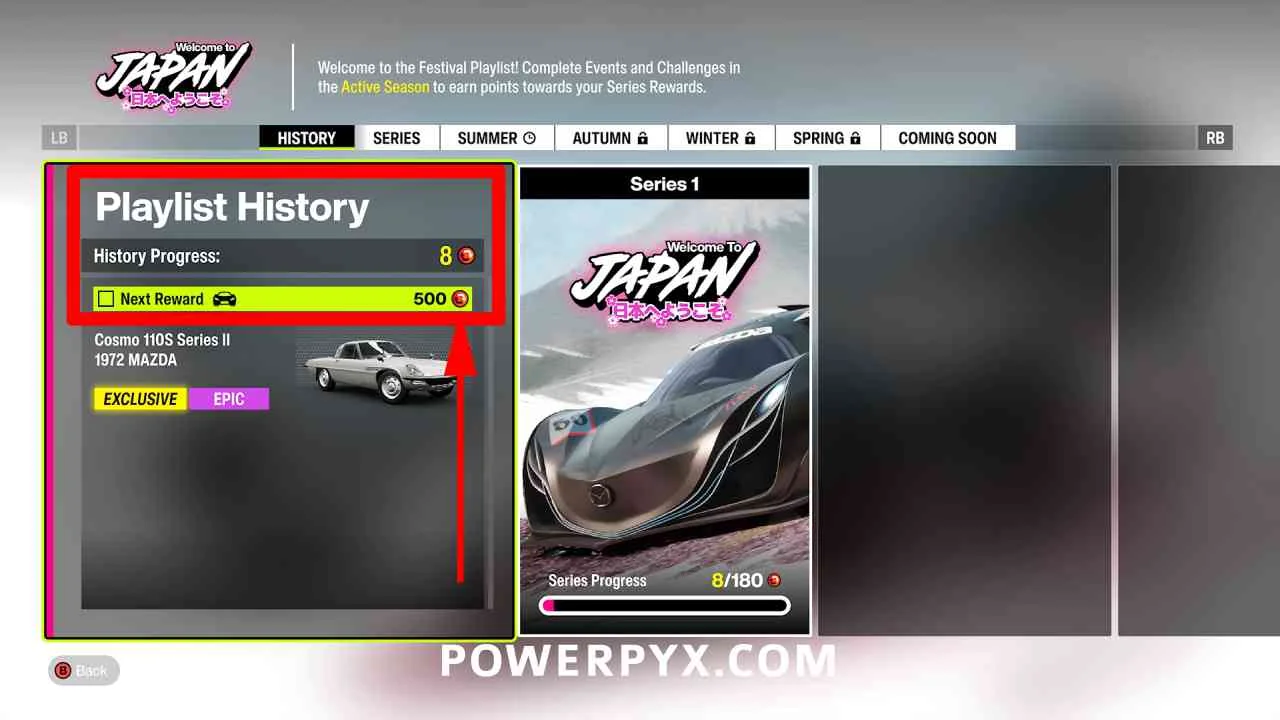
- Open Playlist History and read your cumulative total beside the History reward target.
- Highlight the reward you have reached and follow the claim prompt shown for your current controls.
- Allow the reward presentation to finish, then check the exact year and model in your collection or Garage.
The Historic Effort achievement walkthrough shows the menu route through Campaign, Festival Playlist, History and Playlist History. Its launch-era discussion concentrates on the first five-hundred-point reward. Use that interface guidance alongside the newer official reward table, rather than assuming an early screenshot still contains every tier now available.
A controller guide may describe an X-button claim. Follow the button or key displayed by your own version of the game instead of pressing an unrelated keyboard letter. The important action is claiming the selected History reward, not simply hovering over its picture or opening the ordinary weekly reward screen. Take a moment to read any confirmation rather than backing out immediately.
If your total is below the card's target, there is nothing to repair at the claim stage yet. Return to the live Playlist and complete eligible cards. If the total has reached the target, inspect whether the reward is already marked as claimed before investigating a missing vehicle. The game can distinguish having met a milestone from having completed its reward interaction.
Keep your campaign progress and this claim task separate. Our campaign walkthrough helps with the initial Invitational gate; it is not a requirement to replay that event whenever a new History reward arrives.
Build a realistic plan for the points still missing
Subtract your displayed lifetime total from the next reward threshold. This gives a useful personal target without assuming that every available event is equally convenient. For example, a History total of four hundred and twenty leaves eighty points to the Cosmo. That arithmetic is a planning example, not a promise that a particular week contains eighty obtainable points.
Make a short list from the active Playlist rather than a launch-era maximum-points chart. Record the card name, points displayed, required car, completion condition and whether you can access the mode. The official event archive helps identify tasks, but the current game remains the place to confirm your own completion and remaining time. Do not count an item twice because a guide lists both its credit payout and its Playlist contribution.
Count completed cards rather than repeated races
A satisfying replay is not automatically a new Playlist award. Check whether the card has changed to completed and whether the relevant counter increased. If you enjoy repeating a race, that may be worthwhile for other rewards, practice or campaign progress, but it should not become an assumed unlimited History-points loop.
Pay special attention to activities that appear across a Series, such as Monthly Rivals. Their appearance in more than one seasonal view is a reason to inspect their existing completion state, not to add the same reward to your estimate four times. Track actual credited progress after completing the task. This also makes it easier to identify which genuinely unfinished card could close a small gap.
Choose a weekly budget you can actually finish
Use your own recent completion rate. If you need ninety points and can reliably earn thirty per week, three comparable weeks is a reasonable estimate. At forty-five per week, the same numerical gap would take two. These examples assume those points remain available and are actually completed; missed sessions, different requirements and inaccessible modes can change the result.
Prioritize a nearby seasonal reward when the same activities also advance your longer target. Someone with a short session might begin with a straightforward photo or skill card, then decide whether a championship fits the remaining time. Someone who enjoys co-op can select a suitable team activity. Neither approach requires pretending that all modes have the same access conditions.
Keep the estimate flexible rather than borrowing a claim that the Cosmo always takes a fixed number of weeks. A new player, a returning player with several hundred points and a completionist start from different totals. Your current counter and the available cards are a stronger basis than an old calculation written before later series or reward changes.
Understand what a new season or update changes
The reason History works across series is its lifetime basis. A new seasonal selection changes the live activities and their earning windows; it does not turn the History target into a requirement to earn all five hundred points in that one week. Keep a record of the cumulative number before a transition if you are concerned about whether progress carried correctly.
There is an equally important limit: viewing an old Series in History is not a general promise that every expired task can be completed today. The archive is useful for understanding what you earned and which conditions applied. Follow the active cards for new progress, unless Playground has explicitly announced a retrospective correction or another special opportunity.
The November 2 release notes provide a concrete exception worth checking. They describe retrospective points for eligible players affected by the third part of the Series 5 Spring Weekly Challenge and the seventh Daily Challenge in Series 6 Summer. For redeeming the Series 5 points and associated rewards, the notes specifically instruct players to visit British Automotive in the Playlist History tab.
That instruction applies to the announced correction and its qualifying play periods. It does not mean every missed challenge is automatically awarded, or that simply opening all previous Series grants their maximum points. Match the correction to the week you actually played and read the release note's eligibility language before treating it as the explanation for your account.
After an update, review both new reward requirements and any recovery instructions. A change to current seasonal car costs should not be assumed to rewrite an unrelated History tier. Conversely, an old achievement guide saying that only one History car exists can be outdated even while its directions to the History menu remain useful. Separating those two kinds of information prevents a correct menu guide from becoming an incorrect reward list.
Diagnose an eligible reward that has not appeared
Identify which part of the process is missing before repeating activities. There are several different situations: the cumulative points are lower than expected, the total meets the threshold but the card is not claimed, the card is marked claimed but you cannot find the car, or the car arrived while an achievement did not. Each needs a different piece of evidence.
For a points discrepancy, compare the relevant completed card with the correct History total and the date you completed it. Check whether a current release note names that exact old problem. A screenshot of an unfinished task does not establish that a reward was earned, while a claimed reward tile gives a more specific starting point than a general statement that the car vanished.
For a missing vehicle, search by manufacturer, year and full model name, and remove Garage filters that could hide it. Compare the collection record with the physical Garage view. Do not assume a search for every Mazda or Lamborghini will make an exact variant obvious among a large collection. If you have sold or otherwise removed a previously owned car, document that separately rather than describing it as a first claim that never arrived.
Separate a missing claim from a missing achievement
Historic Effort asks you to earn a Series History reward. Achievement walkthroughs emphasize the History claim interaction; simply owning the same model through another acquisition route is not the same action. Check whether the History reward itself is marked claimed and whether the corresponding vehicle was delivered before treating an achievement notification as the only evidence.
If the discrepancy remains, record the platform, game version, reward tier, displayed lifetime total, claim status and approximate time of the interaction. Include screenshots of the relevant screens when contacting Forza Support. Describe what happened and what you expected, without posting account information publicly. A concise, reproducible sequence is more useful than several unrelated guesses about cars, credits and seasonal counters.
Use the current FH6 known-issues page to check whether the problem matches an acknowledged issue. If broader progress disappeared too, follow the separate lost-save guidance. Deleting save data is not a sensible generic response to a missing reward, and this claim workflow does not promise that support can recreate every missing point or immediately unlock an achievement.
Keep the reward and your future progression in perspective
Decide whether your immediate goal is driving the model, completing the History milestone or earning Historic Effort. Those goals overlap, but they are not identical. A car obtained through another permitted route may solve the first problem without recording the particular History claim involved in the other two. Do not spend credits on an assumed shortcut to a progression action.
The FH6 car catalogue is useful for identifying the exact year and model before choosing your next objective. Acquisition information should then be checked against the current game. A model's presence in a catalogue does not by itself mean that the Autoshow sells it, that an Auction listing is currently available or that a timed earning window remains open.
Car Pass also follows a different system. Its weekly additions depend on the relevant entitlement and release schedule. The History tiers discussed here are based on accumulated Playlist points. Owning a premium edition should not be interpreted as an automatic grant of five hundred or eleven hundred points, and a past Car Pass release calendar is not a substitute for checking the History reward card.
After claiming a reward, note your actual lifetime total and the next displayed target. Continue with activities that fit your available time and collection interests. If you enjoy a particular racing mode, it can remain part of your routine even after both seasonal cars are earned; if time is limited, finishing a smaller selection still contributes to a cumulative target.
The useful habit is to review three things at the start of a session: the current seasonal deadline, the remaining Series target and your next History threshold. Complete the selected cards, confirm that progress registered, and claim rewards from the correct screen. That gives each number a clear purpose and lets a long collection goal coexist with the week you actually have time to play.
Comments (0)
Sign in with Google to leave a comment.