
If an FH6 Weekly Challenge is not counting, identify the exact chapter and week before trying fixes. Compare the car, chapter order and activity conditions, then check whether an official historical issue actually matches your case. This guide, checked on November 17, 2026, explains a controlled troubleshooting process and the narrowly scoped November 2 compensation notice. It does not treat an old community workaround as a guaranteed repair for a current card.
Identify the exact challenge and failed chapter
If an FH6 Weekly Challenge is not working, first record the precise card and chapter that failed. A search for chapter three can lead to a genuine old bug, a different week's photograph, or a guide describing another activity. Those are different diagnoses. Before changing cars or restarting, capture the expanded instruction and the progress currently displayed.
Note the Series, season, challenge name, required vehicle and remaining time. Add your platform and installed game version. For example, the official November 12-19, 2026 City Life Autumn table names Thriller of Autumn and the 2554 AMG Transport Dynamics M12S Warthog CST. A discussion from an October challenge does not establish the cause of a failure on that November card, even when both players use the words Weekly Challenge.
Then describe the failure in one sentence. Did the game fail to recognize the required car? Did a numerical counter remain unchanged after a qualifying result? Did a completed card fail to grant the expected points? A useful sentence names the observable difference, such as a chapter still being unchecked after the result screen. That is more actionable than saying the entire Playlist is broken.
Separate a stuck Weekly Challenge from a different Playlist activity
The official Festival Playlist table gives Weekly Challenge, Photo Challenge, Daily Challenge and Championship separate event types. Their names can overlap, and one car can be useful in more than one task. Check which card you opened before applying a fix. Winning a Seasonal Championship is not evidence that a Weekly photograph should complete, and a successful Photo Challenge does not automatically satisfy a different photography chapter.
Use the normal Weekly Challenge workflow as the baseline: correct active card, exact eligible car and chapters completed in order. Once that baseline is clear, a missing check becomes easier to isolate. Keep the first screenshot as a starting record so you can tell whether a later attempt changed anything. Otherwise, several well-intended fixes can leave you unsure which condition was wrong or whether progress had already advanced.
Check the November 2 chapter-three compensation first
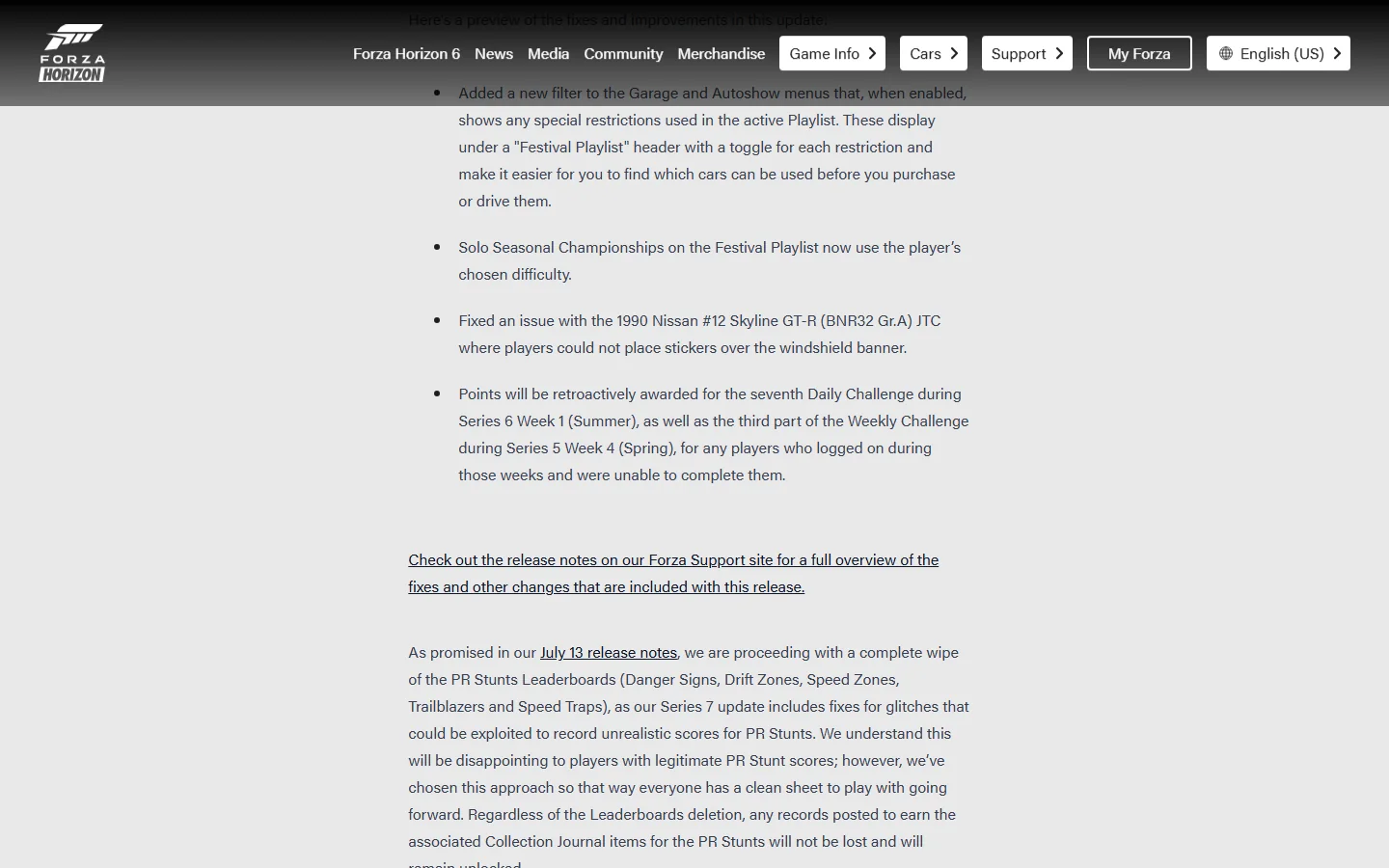
There is an official historical issue that closely matches the search phrase. The November 2, 2026 release notes identify Bug 4590617 and describe retroactive points for the third part of the Weekly Challenge during Series 5 Week 4, Spring. The stated group is players who logged on during that week and could not complete the task. That scope is much narrower than every player who has ever seen a chapter-three failure.
For the specified Series 5 compensation, open the Festival Playlist, move to the Playlist History tab and visit Series 5 - British Automotive. The Developer's Note explicitly identifies that historical Playlist visit as necessary to redeem the points and unlock any resulting rewards. Do not look only at the current City Life card or assume that installing the update alone completes this step. Check the historical points and any reward eligibility after visiting the named Series.
Compare your own dates before doing anything else. If you were affected during that precise historical week, check the relevant progress after updating and reviewing the official notice. If the expected outcome is still unclear, include the old week and your current version in a support report. Do not repeatedly attempt a current week's unrelated objective expecting it to repair a historical entry.
If you were not playing during that week, the notice does not establish entitlement to those retroactive points. Likewise, if your problem is in City Life or a later Series, the earlier bug number is useful context rather than a diagnosis. Reproducing an old player's screenshot or seeing the same chapter number does not show that the underlying cause is identical.
The same release notes separately address the seventh Daily Challenge in Series 6 Week 1, Summer. Keep that case separate from the Series 5 Weekly issue. One concerns a Daily card and another concerns a chapter in a Weekly chain. A compensation announcement can mention both without turning them into a single all-purpose Playlist fix.
This distinction helps you read community results critically. A thread can accurately describe what happened to its author and still be unsuitable guidance for your current card. Check its publication date, named event and follow-up comments. An old workaround is not a replacement for the official scope, and a promise that a particular restart will award all missing points needs stronger evidence than a similar title.
Keep a copy of the relevant official note with your screenshots when reporting a compensation concern. State which part of the eligibility you believe applies and which result you expected to see. That makes the request precise without assuming that support can reopen every expired task or restore every kind of progress. The current official response should determine what happens next.
Recheck the car and the order of the chapters
Before calling a failure a bug, compare the required car with the selected Garage entry. Read the full year, manufacturer, model and edition. The same brand, a similar body shape or a higher-performance version is not enough when the card names one exact vehicle. Use the car catalog to identify the entry, then confirm it against the current in-game requirement.
Check the chapter sequence next. The Weekly chain advances through its displayed chapters. If an earlier condition is still unchecked, do not assume that an action intended for a later step will be stored and credited afterward. Reopen the chain and identify the currently active instruction. This is particularly useful after switching activities or returning from a break, when remembering the last objective can be less reliable than reading the current card.
Inspect restrictions independently from identity. A car can have the correct model name while its build is unsuitable for a separate event you chose to complete a chapter. Equally, a car can be eligible for a nearby championship without being the named Weekly vehicle. The November update added eligible-car filtering to Garage and Autoshow menus, but the filter does not remove the need to read the particular card you are solving.
A matching model is different from an unverified workaround
Some community reports describe changing to another owned example of the same model. An October 1 discussion, for instance, includes a player saying an awarded duplicate registered a photograph when an existing car did not. That is a report about one situation, not evidence that everyone should buy another car. It also predates the November chapter-three compensation announcement.
If you already own a second matching example, a carefully recorded comparison may help describe a reproducible problem. Note what stayed the same and what changed. Do not spend a large amount on an unverified duplicate merely because a commenter said it helped, and do not present the result as proof of a general fix if you cannot reproduce it consistently.
Make the straightforward checks first: correct card, correct identity, correct active chapter and the right event conditions. Preserve the evidence when all four appear correct but progress still fails. That is the point at which a comparison becomes useful to support, rather than another guess added to a growing list of unexplained changes.
Test the required action with one controlled attempt
Choose one attempt that answers the active instruction as clearly as possible. Capture the counter before starting, keep the eligible car selected and avoid changing the event mode midway through the test. After the result, return to the card and record whether the relevant check changed. This is a diagnostic method, not a promise that repeating an event will clear a server-side failure.
Read the target's exact wording. An instruction to win differs from one to complete; a total-star target differs from a single-result target. A named activity differs from any event on the same road. If a guide abbreviates the objective, compare it with the expanded card before testing. The official event hub is useful for identifying a task, but its overview is not a full transcript of every chapter.
Race results, skill targets and photographs fail differently
For a race condition, confirm the race category, mode and final result. Wait for the result screen rather than treating a finish-line crossing or a personal-best time as proof of the required outcome. If you are actually troubleshooting a multi-race Seasonal Championship, use the championship completion guide; its overall-result checks address a different activity from a Weekly chapter.
For a skill or stunt condition, record the target noun and the displayed result. A named Skill is not automatically the same as a Skill Chain score, and a speed measurement is not a star count. If the instruction requires banking, completing or reaching a specified total, verify that exact condition. Avoid assuming a single universal counting method for all Weekly tasks.
For a photograph, compare subject, location and any action or state required. During the dated Warthog week, community reports specifically emphasize reading the airborne condition rather than taking an ordinary stationary picture. Use your live chapter as the authority. A picture can look thematically correct while failing a mechanical condition that the game is checking.
After one controlled attempt, use the result to choose the next question. If one part registered and another did not, preserve that distinction. If nothing changed despite a clearly matching result, stop stacking unrelated fixes and prepare a concise report. A before-and-after pair with the exact instruction provides more useful evidence than several screenshots of a car parked near a challenge icon.
Rule out a stale session without putting the save at risk
After recording the failure, check whether your game has the latest available update for its platform. Compare the official release note date and version information rather than assuming that every device in a household is running the same build. An update can matter to a documented issue, but installing one does not prove that every unrelated chapter has been repaired.
If the game appears to be displaying an old state, a normal full close and relaunch is a reasonable reversible check after allowing progress to save. Follow the platform's ordinary closing process rather than relying only on resuming a suspended session. Reopen the exact card before attempting the task again and compare it with your saved starting screenshot. Treat the result as a test, not a guaranteed cure.
Be particularly careful when switching devices or encountering a save-selection prompt. Forza has separate official guidance for FH6 lost-save issues. Follow that guidance when a cloud or local save conflict is involved. A single missing Playlist check is not a reason to delete a save, choose an older record blindly or apply recovery steps intended for an invalid profile.
Avoid combining several risky changes because an old forum post lists them together. Deleting data, changing a system clock or repeatedly switching between offline and online play can obscure what the current state actually is. This guide does not establish those actions as verified Weekly Challenge fixes. Preserve the save and record the problem while seeking the appropriate official instructions.
If the issue includes an explicit connection error, check the service condition separately. The FH6 server-status guide explains how to distinguish connection trouble from an ordinary task requirement. A service interruption may affect access, but it does not show that the selected car or chapter is correct. Keep both observations in the report when they occur together.
Once you have a fresh session, repeat only the controlled attempt you already defined. Compare before and after instead of beginning a new collection of guesses. If the same valid result still fails to register, you have a stronger reproduction to submit. If it works, retain the details without claiming that the same procedure is a universal solution for everyone else's different card.
Report a reproducible failure and track the outcome
When the conditions match and the same result repeatedly fails, prepare one clear report. Forza's Feedback Portal instructions recommend checking existing submissions and providing specific details. Search for the named challenge and platform, then read the scope of any existing issue before adding your evidence or starting a new report.
Include the challenge name, Series and season, chapter wording, car identity, platform, version and the time of the attempt. Explain the steps in the order you performed them. Attach a before screenshot, a qualifying result and the unchanged card when possible. Describe whether the behavior happens every time or only intermittently. That distinction can be important even when both situations feel equally frustrating.
Keep the description focused on what you observed. You do not need to diagnose an internal server fault or claim that every player is affected. If a community workaround changed the result, say exactly what you changed and whether you reproduced it. Remove personal account details from public attachments and use the official reporting process for any information that support specifically requests.
Distinguish chapter completion, points and the reward
Track three separate observations: whether the chapter advances, whether the relevant Playlist points change, and whether the listed reward appears. A card that remains unfinished is a different report from a completed card with an apparently missing payout. The November compensation note itself concerns points for a defined historical failure; it should not be expanded into a promise about every item or balance.
If the task completed, compare the reward with the current card. Check whether you are looking for credits, a cosmetic, a car or progress toward a ladder. Save the relevant balance or inventory screen, and note purchases or other rewards that could make a before-and-after comparison unclear. Do not invent a fixed waiting period or assume that a different week's reward table is authoritative.
Keep the report reference and any official follow-up with your original screenshots. Recheck later release notes for the exact issue rather than treating a general stability update as confirmation. If the activity expires before a resolution, retain its dates and evidence. A clear record gives you a way to understand a future fix or compensation announcement without rewriting the history of what actually happened in your game.
Comments (0)
Sign in with Google to leave a comment.