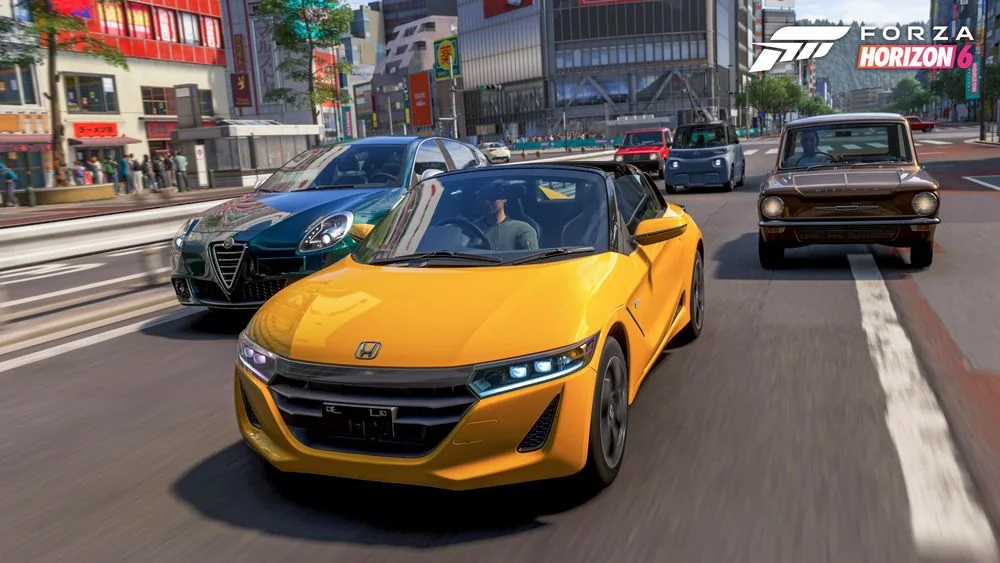
To complete an FH6 Seasonal Championship, enter the correct active event with an eligible car, finish its connected races and check the overall championship result. A single race win is not the same as completing the championship. If progress still fails to register, compare the event requirement, final result and Playlist tile before repeating anything.
This guide covers locations, eligibility, rewards and troubleshooting with facts checked through November 9, 2026. It includes the November update's solo difficulty change and keeps solo, co-op, The Trial and Spec Racing separate.
Read the active Seasonal Championship before racing again
Open the Festival Playlist and read the specific tile you are trying to finish. Record its name, season, dates, car restriction and completion requirement. Then describe the actual failure: you cannot find the next race, your car is rejected, the championship is unfinished, or a completed activity has not delivered what you expected. Those are different questions, even when each is described as a championship not counting.
Use the official FH6 Playlist events and rewards hub to compare the current event name and routes. Its table contains previous seasons as well, so select the right Series and season before using a row. A video from another month may show a real event without showing the event currently available in your game.
If the Playlist itself is unavailable to a new player, check campaign progression first. Playground's original FH6 Playlist introduction places its unlock after earning the first Wristband. Do not treat a tutorial/progression gate as proof that a weekly championship is broken, and do not buy a car before you can inspect the activity you intend to enter.
Separate Seasonal Championships from The Trial and Spec Racing
A Seasonal Championship, The Trial and Spec Racing are not interchangeable names for any race shown near a Playlist objective. The mode and requirement printed on the tile determine what result you need. A named Skill in one mode is also different from winning a championship in another.
Spec Racing uses assigned stock cars, so advice about bringing your own seasonal build may not apply. If that is the activity your tile actually names, use the FH6 Spec Racing guide. If it names The Trial, inspect its team-based requirement rather than applying a solo result to it. For an ordinary Seasonal Championship, stay focused on the event's own restrictions and overall result.
Save the requirement screen before changing anything. It gives you a stable reference when comparing advice, checking the next route or asking another player for help. You can then explain exactly what you attempted, rather than relying on a similar-looking race icon or an abbreviated event title.
Find the start and the remaining championship races
Use the active Playlist tile to identify the championship, then compare the listed routes with the map. A Seasonal Championship is a set of events, so its location question has more than one answer. Finding a circuit with a familiar name does not establish that you have entered the required seasonal version or completed the other routes in the same championship.
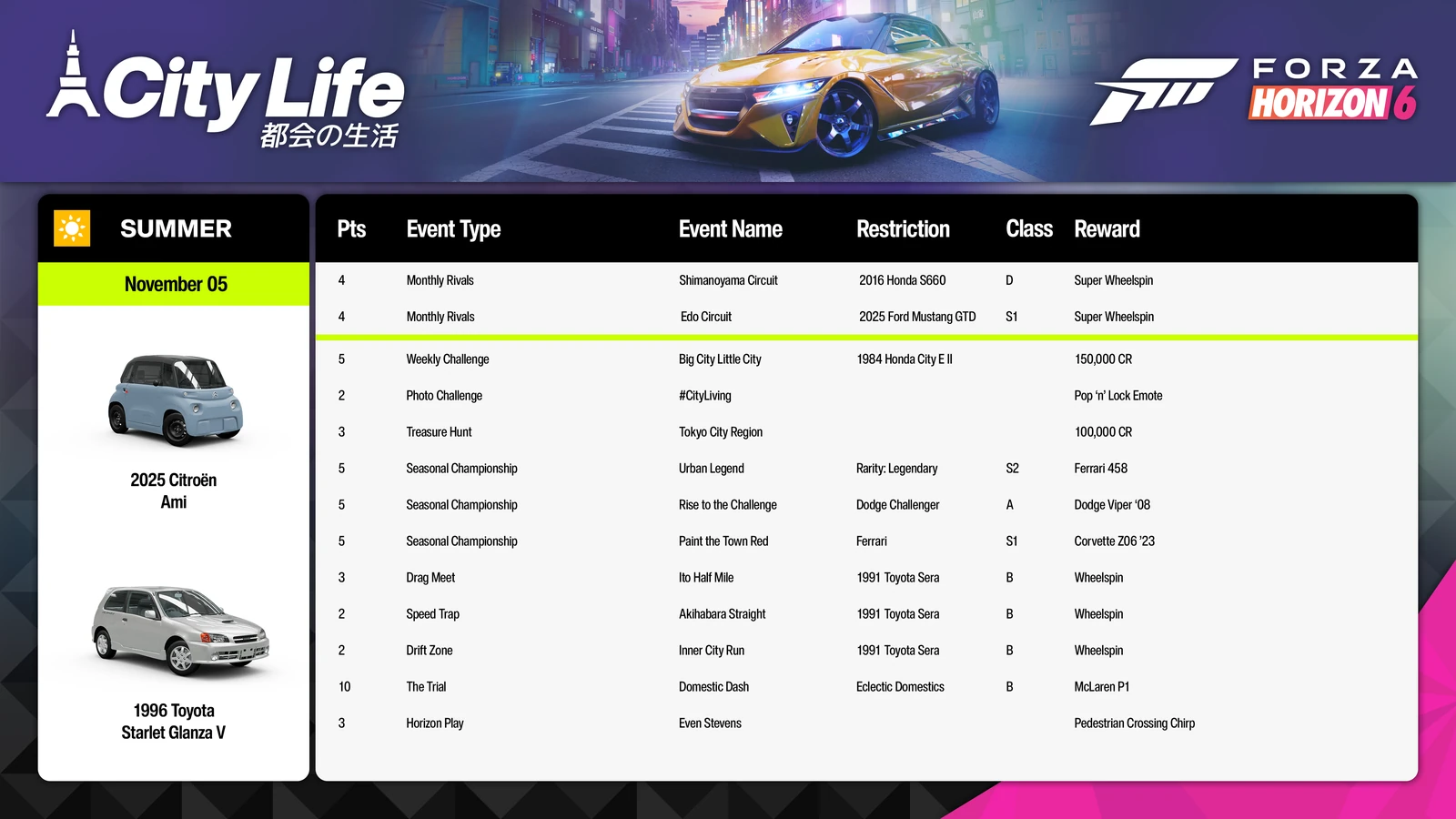
For a dated example, the official table lists Urban Legend during City Life Summer, November 5-12, 2026, across Tokyo Railway Sprint, Festival Sprint and Shimanoyama Sprint. Those three route names are a useful checklist for that championship. They are not a permanent location list for every future Urban Legend search or another week's activity.
Before beginning, note the routes for your own event. After a race, inspect the result and return to the map or Playlist to identify what remains. A recommended-next screen can contain other races; selecting a recommendation without reading it may lead away from your championship. Compare the event name and context rather than assuming the nearest or most prominent icon is the correct continuation.
A seasonal-events map filter can reduce clutter, but it may still leave several championships visible. Keep your route checklist beside the event you started. If the game warns that selecting an activity will abandon the current championship, stop and read it. Do not approve the warning merely to see whether the icon is the right one.
Older players' reports describe confusing recommendations and difficulty identifying a remaining event. They disagree about icon colors and suggested fixes, so this guide does not prescribe a universal color or left-to-right order. If you have matched the correct event and still cannot find the remaining route, preserve a screenshot of the active championship and filtered map. That gives a progress issue something concrete to investigate.
Choose an eligible car and check the installed build
Check eligibility before looking for more speed. A car that feels ideal for the route is still the wrong choice if it does not satisfy the event. Buying an expensive model or downloading an impressive-looking build cannot replace reading the restriction attached to the championship you selected.
Read the car restriction and performance limit together
Treat the entry requirements as a combined test. The event may identify a car group, manufacturer, model family or special restriction as well as a performance class. Matching one part does not establish that the other part is satisfied. Read the complete line rather than stopping when you recognize a class letter.
The City Life update added a useful check: the Garage and Autoshow can show active Playlist restrictions under a Festival Playlist filter header, with toggles for the relevant restrictions. Use that current in-game filter and the event's eligibility display before spending credits. It is more informative than guessing from the car's appearance or a list made for another week.
Our FH6 car database helps identify a model and its reference information, but inspect the vehicle you are actually about to enter. A stock database record and a garage car with a particular installed build are not the same observation. Recheck the displayed class and eligibility after applying a setup instead of assuming that remembering the base model is enough.
Use a suitable build without guessing a universal best car
Once the car qualifies, choose a setup that suits the routes and your ability to control it. A championship with repeated braking and direction changes asks different things from a route dominated by long straights. Stable exits and predictable responses are useful selection criteria; an impressive top-speed claim on its own does not answer them.
If you use the community tune browser, verify that the actual in-game setup is for FH6, your exact vehicle and the required class. Do not use an unavailable or N/A code as if it were a working recommendation. Inspect the result after installation and test whether you can brake, turn and accelerate comfortably before committing to the series.
This guide does not prescribe a single rare car, an AWD conversion or a named share code for every championship. Start with an eligible option you can use consistently. If you change the build after a poor attempt, change one relevant weakness at a time and check eligibility again. That gives the next run a clear purpose rather than another expensive guess.
Finish the championship rather than one race
A first-place race result and a completed championship are different milestones. The current official championship entries list a set of three routes. Work through the connected events and judge the outcome from the championship result, rather than expecting the Playlist tile to finish after the first win.
Review the overall result before leaving
For a normal solo Seasonal Championship win, the important result is the most points overall at the end of the set. You do not have to interpret every individual race as a separate must-win objective. Equally, one excellent result does not cancel the need to complete the remaining championship events.
Read the standings after each race and keep track of what remains. If you lose time in one race, decide what the overall standings require before restarting out of frustration. This guide does not promise that a particular combination of finishes always wins: the opponents' results matter too. The actual table is the information you need.
At the end, distinguish race finishing position, championship standing and the Playlist's completion/points display. Save the final result if you think the correct championship was won without the tile updating. A screenshot from race one establishes much less than a final championship result accompanied by the matching event requirement.
Keep solo and co-op progress evidence separate
If you entered co-op, inspect the outcome the team mode actually reports. Your personal finishing position alone does not establish the team's success or the final championship outcome. Keep the lobby's selected mode and result together when comparing your experience with someone else's solo run.
Stay through the event's recorded conclusion instead of applying an early-exit shortcut from an unrelated guide. If a friend reports completion and you do not, compare what each account's Playlist shows, when each player joined, and whether either connection dropped. Those details help identify the difference without assuming that every account in a session necessarily recorded the same outcome.
If you switch between solo, co-op and another activity while testing, write that down. Otherwise, a result from one format can easily be compared with the rules or screenshot from another, leaving the original problem harder to reproduce.
Use the current solo difficulty rules
Solo Seasonal Championships now use the player's chosen difficulty. This is an announced change in the November 2, 2026 release notes. Advice that simply tells every FH6 player to select Highly Skilled because an older Horizon game required it does not reflect that current solo rule.
Check that your game is updated, review the difficulty you normally use, and choose a setting you can handle for the next solo attempt. If the real obstacle is keeping up with the AI, a manageable difficulty and a controllable eligible build address that problem more directly than repeatedly buying different cars. You still need the correct event and its required championship result.
The same notes separately say that co-op Seasonal Championship difficulty increased. They do not establish that a solo difficulty selection controls the co-op event. Keep the mode in view when reading advice or comparing results with a friend, and do not apply the solo statement to The Trial or every other Playlist activity.
Difficulty and completion registration are also separate checks. Losing the championship, winning the wrong event and winning the right championship without a completion mark are different outcomes. Record which happened before changing another setting. If you have the correct final result but no progress, move to the evidence checks below rather than treating difficulty as a universal repair.
Diagnose a missing completion mark or reward
Use the branch that matches the screen you actually have. An unfinished tile, a completed event with an unexpected reward state, and the wrong season selected need different evidence. Repeating the same race does not help you distinguish them unless you first record what changed.
The championship still looks unfinished
Compare the active event's exact name and route list with the championship you completed. Confirm the overall result rather than only one race's result. Check whether you started another championship, accepted an abandonment warning or left before the set reached its recorded conclusion.
If those checks agree, capture the requirement, final championship standings and unchanged tile together. You may have a reproducible progress problem rather than a misunderstood route. A normal relaunch can be a reasonable observation after preserving the result, but it is not a guaranteed repair. Record whether the same tile changes afterward instead of repeatedly resetting the test.
The event is complete but the reward is missing
Read the named reward on that event. The prize for a championship and a car unlocked by the season's total Playlist Points are different rewards. The official hub separates event, season and Series rewards. A completed championship does not necessarily mean that a larger season-total threshold has been reached.
Use the thresholds shown for your current Series. City Life reduced the points required for new reward cars, so an old guide's blanket 20/40-point explanation should not override the actual screen. If the interface offers a claim action, follow it, then inspect the relevant inventory using clear filters. For a car, compare the exact entry rather than an approximate model name.
If the game displays a capacity, ownership or delivery message, save its wording. Do not assume that every absent reward has the same cause. A screenshot showing the completed tile, points total and the particular missing item is a stronger report than a general statement that the garage looks unchanged.
A different activity or expired season is selected
Check whether you are reading the current Playlist, an older Series in history, or another mode's objective. Race and championship scoring are not the same counters as season and Series Playlist Points. Compare like with like before calculating what should have been added.
Do not assume you can replay every ended seasonal event for its original reward. Official compensation announcements apply to the particular tasks and eligibility described in them; they are not a blanket recovery rule for every missed championship. If your issue concerns an old week, include that date and task name when checking the relevant announcement or contacting support.
When access or a connection error blocks progress
Check whether you are unable to enter the activity at all, or whether a session drops after it begins. A missing multiplayer menu, an account/access prompt and a disconnect during the final race are different failures. None is explained simply by saying that the championship reward did not arrive.
For a new profile, review opening progression. FH6's official FAQ describes the basic multiplayer unlock after the first Tokyo City race with Mei and her friends. That does not remove a particular activity's own prerequisites. Read any specific access message rather than assuming every Playlist tile opens at the same moment.
Record the failure before changing accounts or settings
Save the exact error text, platform, time and point in the championship where it happened. If you were in co-op, note whether other players stayed connected and what the final team result showed. Compare that evidence with current service notices and the official known-issues information. A service page's status now cannot by itself establish what happened during an earlier race.
Use our FH6 connection and server-status guide for a network-specific branch. Avoid mixing a network test with a new car, account change and different event at the same time. If the next run works, you otherwise will not know which condition changed.
Do not unlink the Microsoft profile or delete progress to test an access error. If the game offers a solo version of the intended activity, inspect that option on its own terms and respect any warning about abandoning a current championship. Choosing a different mode may be useful for a later attempt, but it does not prove that a disconnected co-op run completed successfully.
Report a reproducible problem
If the requirement and final result agree but completion still does not register, check the official FH6 known-issues page and follow its link to the active Feedback Portal. Search for a report matching your mode and symptom. An old discussion with a similar title may concern a different activity or a version that no longer behaves the same way.
Prepare the following details before submitting or adding evidence to a matching report:
- Your platform, game build and the date and time of the failed attempt.
- The Series, season, full championship title and requirement screen.
- The actual car and installed class used, plus whether the session was solo or co-op.
- The routes completed and the final championship or team result.
- The Playlist completion mark, points or specific reward that remained unchanged.
- Any error message, disconnect, abandonment warning or relevant steps you already tried.
Keep screenshots of the requirement and outcome together, and describe a short sequence another person could follow. Distinguish what you observed from what you suspect caused it. Support can investigate a well-defined mismatch more effectively than a claim that every Seasonal Championship is broken, and you retain a clear record if a later update or repeat attempt changes the result.
Comments (0)
Sign in with Google to leave a comment.