
If you want one Forza Horizon 6 interactive map for a full collectible cleanup, start with MapGenie for searchable pins and progress tracking. Use ForzaLabs when the problem is a missing road, or Shackmaps when you want a straightforward browser map. The official FH6 Treasure Map is a separate $2.99 US add-on that places many hidden-item locations directly on the in-game map. It is the most convenient option, but it is not a universal 100% completion button.
This guide was checked on July 31, 2026. It compares what each live tool actually does, explains the official add-on's limits, and gives you a repeatable cleanup workflow. For a tour of Japan's regions and landmarks rather than map tools, use our complete FH6 map guide.
Best FH6 Interactive Maps at a Glance
| Map or tool | Best for | Useful features | Main limitation |
|---|---|---|---|
| MapGenie | General collectible tracking | Search, filters, found markers, notes, web/app sync | Unofficial; some features may require an account or purchase |
| Shackmaps | Fast browser reference | Regional categories, hidden cars, collectibles, events, PR stunts | Less focused on road-completion analysis |
| ForzaLabs | Finding missed roads | Asphalt, dirt and backroad layers; road-route tools; marker filters | Third-party data can continue changing |
| Map Master | Detailed checklists | Search, category counts, custom markers, individual location guides | Large category set can feel busy during a focused sweep |
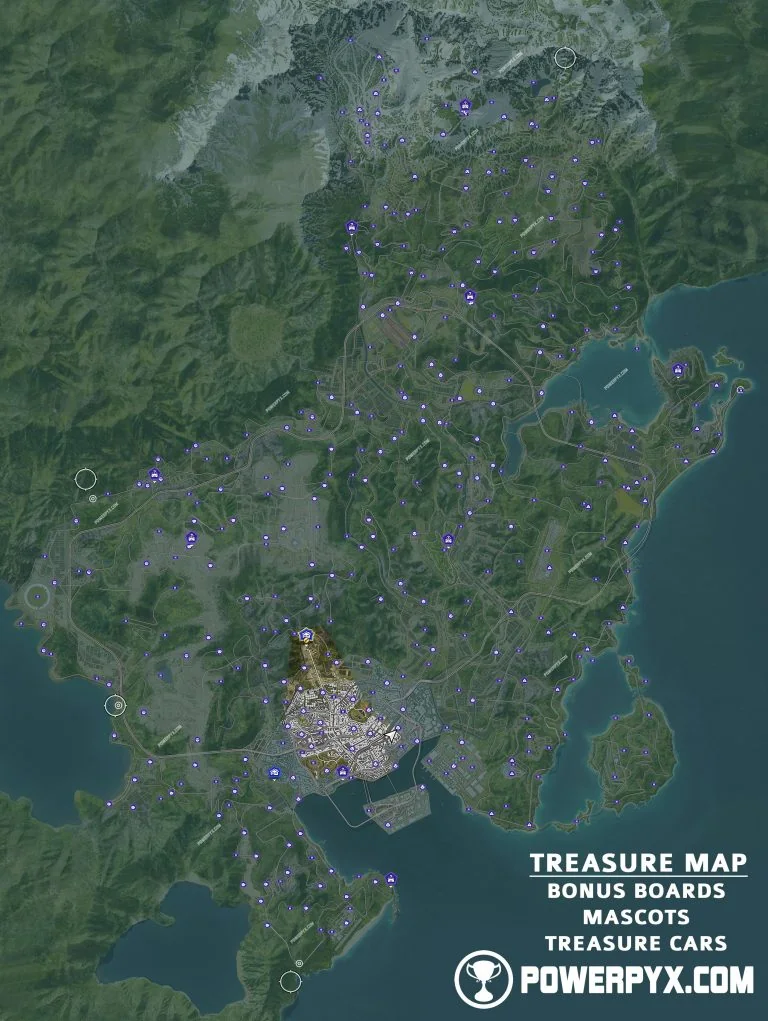
| PowerPyx static map | A no-login visual reference | Full-map image and practical Bonus Board/Mascot notes | No personal progress tracker or searchable pins |
| Official Treasure Map | Native in-game convenience | Reveals supported hidden items on the game map | Paid, excludes seasonal collectibles, does not bypass progression |
Best overall tracker: MapGenie
MapGenie is the easiest default recommendation for a long cleanup because it combines search with a personal checklist. Its current Google Play listing advertises more than 700 locations across more than 30 categories, including Barn Finds, PR stunts, races, Bonus Boards, Regional Mascots, Treasure Cars and Aftermarket Cars. More important than the headline count, it lets you mark a pin as found, add notes and synchronize progress between its website and app.
Those totals are MapGenie's own current listing claims, not official Playground Games numbers. Treat the game and its Collection Journal as the final record. MapGenie also identifies itself as an unofficial fan-made product and includes in-app purchases, so check the current free allowance before committing your entire checklist to it.
Best quick browser map: Shackmaps
Shackmaps is a good choice when you want to open a map on a second screen and begin filtering immediately. Its live FH6 map separates hidden cars, smashed collectibles, stories, races and other activities, with many groups subdivided by region. That regional organization is useful when your in-game completion screen says one part of Japan is missing something but does not tell you which pin.
You can browse without turning the task into a spreadsheet. A free Shackmaps account also supports suggested or custom pins, which can help when a jump approach or access road is more useful than the collectible's exact coordinate.
Best map for all roads: ForzaLabs
ForzaLabs stands out because it treats roads as a separate problem. Its road tools can highlight asphalt, dirt, backroads and snow routes, and it offers a route intended to cover the road network efficiently. That makes it a stronger companion when your issue is a tiny unregistered segment rather than a missing Bonus Board.
The same page also filters stories, races, PR stunts, houses, Treasure Cars, discovery locations and XP Boards. Use those marker layers for planning, but use the road layers for visual comparison with your own in-game map. A third-party map cannot automatically know what your save has registered.
Best detailed checklist: Map Master
Map Master works well when you want a map pin plus a written guide. Its Japan tracker exposes categories for landmarks, photo subjects, houses, Barn Finds, Treasure Cars, XP Boards, Regional Mascots, races, stories and PR stunts. Many categories lead to dedicated checklist pages with names and contextual instructions.
This is particularly useful for a missing Point of Interest: search a name, compare the expected regional list with your Collection Journal, and then open the relevant pin. As with every community database, do not assume every displayed total is official or permanently fixed. Corrections, expansions and content updates can change a community tracker before or after another site catches up.
Official Treasure Map vs Free Interactive Maps
The official FH6 Treasure Map and a browser map solve similar-looking problems in different ways. The official add-on pays for convenience inside the game. A community map gives you richer search, filters, notes, screenshots and sometimes progress checkboxes on another device.

What the $2.99 official add-on reveals
On the US Xbox Store, the Forza Horizon 6 Treasure Map costs $2.99. Prices can vary by country and tax. After purchase, open the in-game map and activate the Treasure Map. Microsoft's listing says it reveals the exact locations of:
- Bonus Boards
- Barn Finds
- Regional Mascots
- Treasure Chests
- Treasure Cars
The description also covers supported items in expansions once they become available. The Xbox listing currently identifies PC and Xbox Series X|S as supported platforms and says the add-on requires the game or an eligible Game Pass Ultimate or PC Game Pass subscription.
What the official Treasure Map does not do
First, it does not reveal seasonal collectibles from the Festival Playlist. Weekly props and event-specific objects must still be handled through the current playlist and its clues. Second, a revealed location may remain unavailable until you reach the required point in normal progression. A pin is information, not an unlock.
It also is not a written walkthrough. A marker will not necessarily explain the correct rooftop jump, dirt entrance, Stamp requirement or Treasure Car clue. Community tools can be better when you need an annotated screenshot, a route, or a place to record what you have already checked.
Is the FH6 Treasure Map worth buying?
Buy it if you value staying inside the game, want most supported hidden-item pins immediately, and do not enjoy maintaining a second checklist. Skip it if discovery is part of the fun, if you only have a handful of items left, or if you need detailed route guidance. A free map is also the better first stop for roads and seasonal collectibles because the official add-on does not claim to solve either task.
How to Clear Collectibles Without Losing Your Place
- Choose one source of truth. Keep the in-game Collection Journal as the final count. Use one third-party tracker for notes so you do not split progress across several sites.
- Work one category at a time. Hide everything except Bonus Boards, Mascots, Barn Finds, Treasure Cars or the category you are clearing. Too many icons can hide a short road or nearby pin.
- Work region by region. Compare the game's regional completion before leaving an area. A regional pass is easier to audit than repeatedly crossing the full Japan map.
- Confirm in the game before checking a pin. Third-party check marks do not change your save. Wait for the pickup, discovery notification or journal count to update.
- Add an approach note for difficult markers. For rooftop boards, write down the ramp or hillside you used. For Barn Finds, record the dirt path into the search area rather than only the barn coordinate.
- Reconcile totals after each sweep. If the map says complete but the game does not, filter the journal by region and category. Recheck pins added or corrected after you began.
When a hidden-car pin identifies a model, use the FH6 Tools car database to confirm its year, class and acquisition details. For properties, our house finder is quicker than leaving every world-map marker enabled.
How to Find the Last POI, Hidden Car, or Road
For a missing collectible or Point of Interest
Start in the game's Collection Journal or regional completion view, not on a fully populated browser map. Identify the incomplete region and category, then enable only that category on MapGenie, Shackmaps or Map Master. Search or compare the short regional list. If the in-game icon is already greyed out, it has normally been collected; concentrate on unvisited pins and anything whose availability depends on a Stamp, Wristband or story step.
If a Barn Find circle is active but the barn is hard to see, follow small dirt tracks from a nearby road and use Drone Mode where practical. A coordinate alone may send you through dense trees, while an approach screenshot shows the intended entrance. For Treasure Cars, check both the clue requirement and the final vehicle position; knowing the destination does not always satisfy the step that makes the car appear.
For the last undiscovered road
Road completion deserves a separate process because collectible trackers usually show the world road network, not the parts your save is missing. Begin by hiding all event and collectible icons in the in-game map. Zoom into each region and look for short grey sections, ramps, docks, side streets and stacked Tokyo expressways. At multi-level junctions, drive both levels instead of assuming one pass registered the entire shape.
Next, compare the map against the road layers in ForzaLabs. Its separate asphalt, dirt and backroad views reduce visual noise. If you still cannot find the final segment, a dedicated tool such as FH6 Road Finder can analyze a shared map view and suggest missing portions. Use a clean game-map screen without chat, account details or desktop notifications. Capture-based tools are useful last-mile aids, but they are not official and their result still needs to be verified by driving the suggested segment.
Reports in the official Forza community forum show that the 670/671-road situation is common enough to deserve patience. If the game does not award completion immediately, change location or restart after confirming the counter; do not assume a third-party site can repair delayed achievement or save-state behavior.
Accuracy, Spoilers, and Privacy Checks
- Expect spoilers. Enabling Barn Find, Treasure Car and story markers can reveal discoveries the game intended you to uncover gradually.
- Check the date. Community pins and totals may change after an update, expansion or correction. Reopen the live map instead of relying on an old downloaded screenshot.
- Distinguish official from unofficial. The Xbox Treasure Map is first-party DLC. MapGenie, Shackmaps, ForzaLabs, Map Master and Road Finder are third-party tools.
- Protect screen-share data. When a tool reads a captured map, close messages and overlays and share only the game-map area required.
- Verify in-game. Your journal, achievement progress and save are authoritative. A third-party check mark is only a planning aid.
Forza Horizon 6 Map Tool FAQ
Is there a free Forza Horizon 6 interactive map?
Yes. Shackmaps, ForzaLabs, Map Master and MapGenie all provide live FH6 map access, although accounts, tracking limits or premium features can differ. Check the current terms before choosing a tracker for a long completion run.
Does the FH6 Treasure Map reveal every collectible?
No. The official description specifically excludes seasonal Festival Playlist collectibles. It covers listed hidden-item categories, but some locations still require normal gameplay progression before they are available.
Does buying the Treasure Map collect items automatically?
No. It reveals supported locations on the in-game map. You still need to reach, smash, discover or otherwise complete each item, and progression requirements still apply.
Can an interactive map show my missing roads?
A normal marker map does not know your personal road state. Use in-game regional completion, remove icon clutter, compare dedicated road layers, and use a capture-based road finder only if visual inspection fails.
Can I download an FH6 map?
A static full-map image is useful offline, but it cannot search, filter or track your progress. For a one-session cleanup, keep a browser tracker open on a phone, tablet or second monitor and save only the pins you still need.
The practical choice is simple: use MapGenie for a persistent checklist, Shackmaps for quick reference, ForzaLabs for roads, and the official Treasure Map for the most convenient in-game reveal. Whichever option you choose, let the FH6 journal confirm completion and keep seasonal work in the Festival Playlist tool.
Comments (0)
Sign in with Google to leave a comment.